Page 2 of 5
Coming soon ...
Posted: Fri Mar 13, 2015 12:45 pm
by thombreSoft
- devLab2.jpg (135.22 KiB) Viewed 52021 times
Yeah - you guessed it right

! ... I am adding more image processing capabilities to Baduk Cap:
The next version 3.0 will include
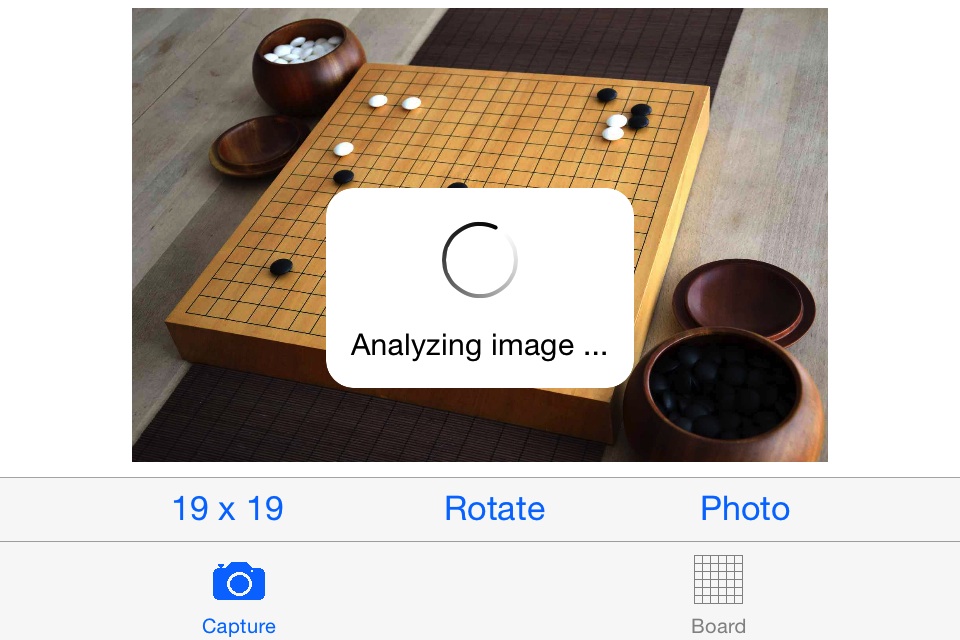
automatic recognition of the grid, making the process of capturing your Go positions almost completely automatic.
Re: Baduk Cap for iOS
Posted: Fri Apr 17, 2015 2:05 pm
by thombreSoft
I uploaded a video on YouTube showing Baduk Cap on iPhone 4S. It includes these features of upcoming versions:
- 3.0 (currently in App Store review): Automatic recognition and placement of the grid
- 3.1: New comparison mode: Overlay
- 3.2: Board corner recognition for problems
https://youtu.be/z5Uj-oNecSQ
Version 3.0
Posted: Fri Jun 26, 2015 11:37 pm
by thombreSoft
It’s been a while since I announced the addition of more image recognition capabilities. It turned out that implementing that grid recognition was more work than expected - a lot more …
But: No efforts have been spared to make your life even easier when it comes to capturing those go positions!
 Out now: Version 3.0
- Automatic recognition and placement of the grid - recognizes positions at all stages of the game: fuseki, middle and end game.
Should you have taken a decent photograph where the grid is not found or placed incorrectly, send it to me via email and I will correct the problem or look for improvements in the algorithm. Use the ‚Save image‘ option to get the original image, instead of taking a screenshot (which would include the grid and therefore not be usable for analysis).
Regarding runtime: processing the image requires a lot of computations. Having a current generation device with a fast CPU really helps here. On an iPad Air 2, the two sample pictures take less than 2 seconds to compute. On previous generation devices, runtimes will increase.
- Overlay comparison
Overlay photo and calculated board for an easier, in-place comparison - especially useful on the smaller iPhone screens (preferred comparison mode can be specified in the app settings)
- Chinese translation
Thanks to Xiang Zhao (author of EasyGo) a Chinese localization is now available.
Screenshot overlay compare on iPhone 4S:
Re: Version 3.0
Posted: Sat Jun 27, 2015 6:52 am
by Bonobo
Great news, thank you!
First, this:
thombreSoft wrote:[..] features of upcoming versions:
- 3.0 (currently in App Store review): Automatic recognition and placement of the grid
- 3.1: New comparison mode: Overlay
- 3.2: [..]
then, this:
thombreSoft wrote:[..]
Out now: Version 3.0
- Automatic recognition and placement of the grid [..]
So this should actually be 3.
1 already? Or have you just integrated the feature planned for 3.1 into 3.0? Downloading it currently, haven’t checked it out yet.
- Chinese translation
Thanks to Xiang Zhao (author of EasyGo) a Chinese localization is now available.
Very nice to see folks co-operating
Screenshot overlay compare on iPhone 4S: [..]
Awesome!
Re: Baduk Cap for iOS
Posted: Sat Jun 27, 2015 7:16 am
by thombreSoft
Yes, Tom, this is due to development and testing of grid recognition taking longer than expected - so I started with overlay compare in parallel.
Re: Baduk Cap for iOS
Posted: Mon Jun 29, 2015 6:19 am
by apetresc
Does the recognition happen on the device, or server-side? If the former, how difficult would it be to port this to a server and provide a (paid) API? I can't imagine the image processing code makes too much use of iOS-specific functionality...
If the results are as good as people are saying, I'd love to try using an API to stitch together an SGF from a video stream of all the moves being played out
Re: Baduk Cap for iOS
Posted: Tue Jun 30, 2015 12:20 pm
by thombreSoft
The recognition runs on the device and does not depend on any iOS-only functionality, true. But providing it as a web service would still require quite some time. So currently, I have to disappoint you ...
Re: Baduk Cap for iOS
Posted: Tue Jul 14, 2015 5:41 pm
by Progenitor
I haven't been on here for awhile, but your implementation of a corner capture compelled me to log on and say thank you! I really appreciate the effort and am super thankful and impressed. This also got me to pull out the old go books and start capturing problems that I was in then past adding manually. This coupled with easy go is by far the most powerful tool set I have to get better at this game we all love.
Twitter
Posted: Sun Jul 26, 2015 9:19 am
by thombreSoft
Apple does not like mailto:my nick @web.de as my Support-URL anymore, therefore you can now follow me on twttr:
https://twitter.com/thombreSoft
Re: Baduk Cap for iOS
Posted: Sat Aug 01, 2015 3:04 am
by thombreSoft
Recently published:
- 3.1 New board size for problems: ‚Corner‘
- 3.2 Korean localization
Out now:
- 4.0 Automatic recognition of dead groups in scoring
After automating grid placement with 3.0, this enhancement now reduces manual interaction during scoring - significantly. Out of 10 randomly picked IGS games, 7 are scored completely automatic with all dead groups being correctly recognized.
Also: After one year of constant improvements and new features, there will be an upcoming price increase. If you thought about downloading Baduk Cap in the past: now is the time to make the purchase.
Re: Baduk Cap for iOS
Posted: Sat Sep 19, 2015 3:29 am
by thombreSoft
Recently published:
- 4.1 Settings icon available (Unfortunately, Apple has not yet fixed a bug causing the settings to be sometimes displayed incompletely. In case that occurs, switch to the settings of another App and back.)
- 4.2 Improved image recognition
- 4.3 Recognition of living & dead eyespace patterns in scoring (bent four, ...)
Also, I uploaded a video showing usage of Baduk Cap under real-life conditions at the local Go club. Running on iPad Air 2, even with the poor lighting conditions, recognition was fast and quite reliable:
https://youtu.be/vBfprA8yqmE
Re: Baduk Cap for iOS
Posted: Sat Oct 31, 2015 3:23 am
by thombreSoft
- Version 4.4 brings iOS 9 multitasking - enjoy using Baduk Cap side-by-side with other Apps
- In China, Baduk Cap has been renamed to 围棋照相机
- For easy try-out, there is now a free version (without export functionality) available:
Baduk Cap Lite
Re: Baduk Cap for iOS
Posted: Mon Nov 16, 2015 9:53 pm
by Frost
Hi, thanks for the nice tool. One suggestion: in addition to 9X9, 13X13, 19X19 and corner, please give us the option to customize the size to be recognized, e.g., 10X19.
As it is, I can only use 19X19 for a picture of 10X19, and half of the recognized board (the other 9X19) is filled with white pieces that are not there in the picture taken. Removing those pieces is very troublesome. This applies to corner as well, as can be seen in the picture below:

The top 3 rows that are filled with white pieces should be blank. They are there because I couldn't tailor the number of rows (and columns) to be recognized to the actual problem. Hope this is clear enough.
Thank you!
Re: Baduk Cap for iOS
Posted: Tue Nov 17, 2015 11:25 pm
by thombreSoft
Thanks for your feedback!
Flexible corners got postponed due to the relatively high effort involved when going from square to rectangular board size ... until now! I have been working on this since the last release. The feature is already implemented and I will actually upload it this evening. If nothing comes up during testing, you can expect version 4.6 within around 10 days. Half boards (e.g. 19 x 8) will not be included yet, but will be available with the release after that.
Re: Baduk Cap for iOS
Posted: Tue Dec 01, 2015 11:44 am
by thombreSoft
- Version 4.6 (now available in the App Store) supports corner and half board positions of arbitrary size
- Version 4.6.1 with additional image recognition improvements was submitted for review
Here’s a video showing the new functionality:
https://youtu.be/J7w3HeCn3WM