@phillip1882
Sorry, but I'm not entirely sure to what you are refering to be honest.
Here below I will give you as much information as I can, hoping to answer your question indirectly.
Game reviews always make calculations for both players. Both players are equal for them.
You can see the names of the players above the board:
- on top of the board there are colors that indicate who plays black or white
- next to your name there is a

which means that you played black.
- there is a percentage at the right of your name, because you played the last move.
- that percentage shows whether you managed to improve or worsen your situation as compared to the best possible move which was available.
- -0.4% is actually really good, so that's why it's marked with a green background color.
The following information is shown on the board:
- the black stone at L3 is marked, because it is the last move which was played.
- it's white's turn now.
- the intersections which are marked with numbers on the board indicate which moves the bot has evaluated.
- the one in blue is the best move.
- it will give white a win probability of 84.1% (only 19 playouts were calculated though).
- you can increase the number of playouts for this specific position by clicking the "Analyze this" button.
- the other move (the shoulder hit in lower right) is also a very good move, that's why it's marked in green.
- there's only a difference of 0.1% between the 2 proposed moves, so they have about the same value.
- these percentages are from the perspective of white, because it's white's turn.
- however, you can change this in in the "More...">"UI Settings">"Winrate perspective". Opinions differ about this. Some think that it makes more sense to express all winrates from black's perspective.
On the right there is a game tree.
- move 15 is marked in yellow, because that's the move which we are currently looking at.
- underneath the game tree there is a list of "worst moves", to quickly navigate to big winrate drops. (e.g. black G3 turns out to be the worst move of the game, and is worth investigating).
Then there is the winrate chart:
- the Y axis shows the winrate, the X axis shows the move number.
- as you can see, the Y axis is slightly zoomed. If you hover the axis with your mouse, then an unzoom button will show.
- The values on the chart are shown in perspective of black. It does not alternate winrates according to color.
- So, for that reason, the 15.92% is in perspective of black.
I'm sorry for giving you all this information.
I hope this indirectly gives an answer to your question. (which I don't entirely understand)
What I think you may be looking for is this settings screen to alternate the perspective of winrates:
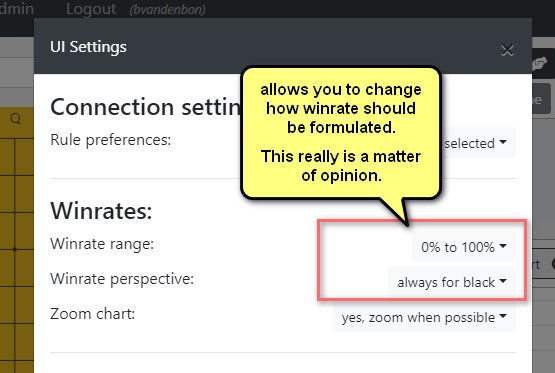
- winrates.jpg (47.18 KiB) Viewed 18308 times
Please do not hesitate to write me back if I totally misunderstood your question.
