Page 4 of 5
Re: Baduk Cap for iOS
Posted: Sun Apr 15, 2018 2:42 am
by thombreSoft
This is an interesting use case … thanks for posting your setup!

Regarding the YouTube video, it does not work for two reasons:
- The video quality is rather poor (240p) and not sufficient for the current recognition algorithms
- When variations are shown, multiple stones are removed from the board. Baduk Cap only supports removal of the last played stone.
At the moment, I am working on image recognition improvements - that might help with the first issue.
Enabling variations, however, would introduce a lot of complexity, both in the program and on the UI, and I currently do not see enough demand to justify that.
Version 5.5: Machine Learning
Posted: Sun Jun 24, 2018 7:43 am
by thombreSoft
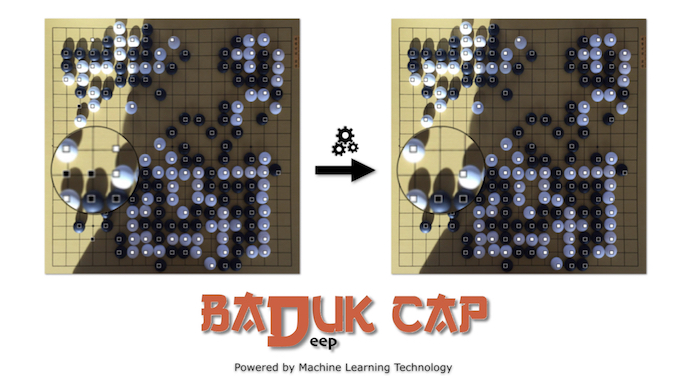
- Badeep Cap 16_9 small.jpeg (262.69 KiB) Viewed 30389 times
Version 5.5 is available:
Baduk Cap now incorporates machine learning to achieve a significantly higher accuracy of the stone recognition.
With the currently used model, the reliability increases by a factor of 10.
Because of the leveraged CoreML programming interface, the update
requires iOS 11.
Re: Baduk Cap for iOS
Posted: Wed Nov 21, 2018 9:54 am
by thombreSoft
It is time for an update about recent enhancements (versions 5.5.1 - 5.6):
- Settings have been removed from the central settings app and can now be adjusted directly within Baduk Cap
- You can tap and hold a photo that you have taken (or imported from the photo library), move it around and discard it by tossing it away from the screen. This brings you back to the first screen with the instructions, settings and credits. (To undo, shake the device)
- It is now easier to accurately position the grid corners, which is especially useful on the small iPhone screen - after adjusting a grid corner with help of the magnifier, release your finger quickly to keep the current position
- Capture of problems from books:
- the available screen estate will now be used to full extent for display of the recognized board corner
- improvement of the recognition algorithm
- Live Capture:
- when you scroll through the moves of a recorded game, you now get haptic feedback
- improvements to the move recognition and editing of a recorded game
As the number of downloads did not correspond to the efforts involved, I have decided - with a heavy heart - to discontinue the Korean localization.
Furthermore, the In-App Purchases for the ‚Scoring‘ and ‚Game recording‘ features are now available as non-renewing subscriptions with a one year duration.
Baduk Cap for iOS: Siri shortcuts
Posted: Sun Feb 03, 2019 9:32 am
by thombreSoft
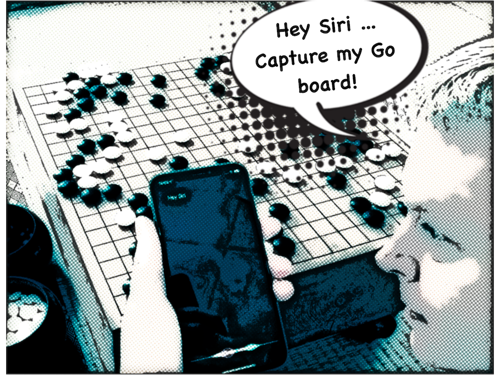
- BC_SiriShortcuts.png (403.02 KiB) Viewed 29626 times
Version 5.6.2 brings Siri shortcuts to Baduk Cap Pro subscribers:
Take a photo of your Go board with a voice command of your choice
Baduk Cap for iOS: Dark Mode
Posted: Sun Apr 07, 2019 6:20 am
by thombreSoft
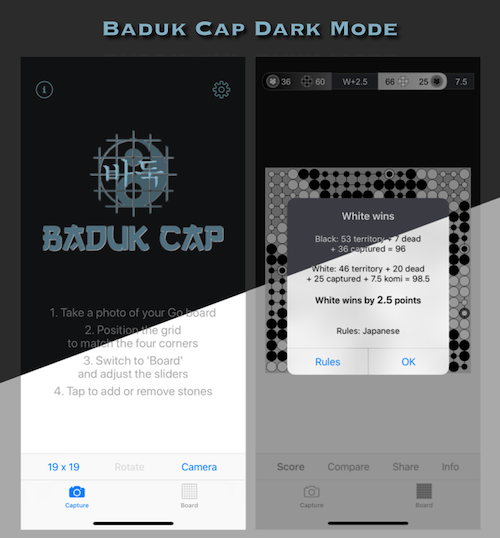
- BC_DarkMode.png (134.65 KiB) Viewed 29383 times
Version 5.6.3 was published with
Dark Mode for Baduk Cap Pro subscribers
Baduk Cap for automatic transmission of moves?
Posted: Thu Apr 25, 2019 10:31 am
by DamirMedak
I understood that the application is great for recording games in order to analyse it later.
Is it possible to transmit the recorded moves directly to an internet go server, e.g. KGS?
If not, is it possible to remotely get the moves on another computer and input it manually to KGS?
Thanks for good work!
DM
Re: Baduk Cap for iOS
Posted: Mon May 13, 2019 11:47 am
by thombreSoft
A transfer of the recorded game moves to a Go server like KGS or OGS is currently not possible.
For my own testing, I was transmitting the game moves from an iPhone above the board to an iPad, but this functionality is not released on the App Store.
Re: Baduk Cap for iOS
Posted: Tue May 14, 2019 9:51 am
by fireproof
thombreSoft wrote:I was transmitting the game moves from an iPhone above the board to an iPad
That sounds like an interesting feature! I hope the testing goes well.
Re: Baduk Cap for iOS
Posted: Wed May 15, 2019 3:12 pm
by DamirMedak
thombreSoft wrote:A transfer of the recorded game moves to a Go server like KGS or OGS is currently not possible.
For my own testing, I was transmitting the game moves from an iPhone above the board to an iPad, but this functionality is not released on the App Store.
Thank you very much for the answer.
I really hope that the words "currently not possible" indicate one possible direction of future research.
It would bring a new dimension to this quite advanced project.
In your opinion, which server (KGS or OGS) would be easier to use for the transfer of recorded moves?
Re: Baduk Cap for iOS
Posted: Thu May 16, 2019 12:55 pm
by thombreSoft
DamirMedak wrote:I really hope that the words "currently not possible" indicate one possible direction of future research.
In your opinion, which server (KGS or OGS) would be easier to use for the transfer of recorded moves?
Broadcasting to a server would be the logical next step for game recording and is definitely something that I already thought about.
When I last checked (a few years back), OGS was offering an API to setup a game and transfer moves. KGS on the other hand did not have such an API at the time.
Re: Baduk Cap for iOS
Posted: Thu May 16, 2019 1:30 pm
by thombreSoft
fireproof wrote:
That sounds like an interesting feature! I hope the testing goes well.
You can see a video about it here:
Re: Baduk Cap for iOS
Posted: Thu May 16, 2019 2:21 pm
by DamirMedak
thombreSoft wrote:fireproof wrote:
That sounds like an interesting feature! I hope the testing goes well.
You can see a video about it here:
I have tested the application today. It took a little time to get everything right, but it is quite intuitive.
I borrowed an iPad6 and used a "side-view". It seems that each move takes some time to be recorded (live-video mode). The set-up (iPad sitting on a pile of books) was "shaky" and I guess that the combination "iPhone with a stand" would be better.
I have two questions:
1) does it work with an iPad Mini?
2) is it too difficult to implement the Chinese scoring (not necessary to count off-the-board prisoners by hand)?
Re: Baduk Cap for iOS
Posted: Thu May 16, 2019 11:28 pm
by thombreSoft
Yes, it will work with an iPad mini.
Chinese scoring is active when you set Chinese rules either on the second tab under ‚Info‘ or you can switch the ruleset on the result explanation popup that you get when you tap the scoring result.
Baduk Cap 5.7: Share photos with development
Posted: Sun Jun 16, 2019 1:03 pm
by thombreSoft
Here at the thombreSoft headquarters, we are always looking for ways to improve the experience for our users.
To support us with that, version 5.7 allows you to share images that you took within the app or imported from the photo library. Go to Settings > Support and flick the switch:
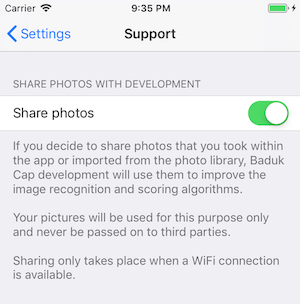
- SharePhotosDialog_small.png (57.46 KiB) Viewed 28698 times
Your photos enable our engineers to identify problems and improve the image recognition and scoring algorithms.
(Yeah o.k., you got me - there is no team of engineers … it’s just me.

)
Re: Baduk Cap for iOS
Posted: Mon Jul 22, 2019 12:46 pm
by DamirMedak
Hi,
We used the Baduk Cap with the iPad Mini with a Lamicall gooseneck tablet holder (
https://www.amazon.co.uk/Lamicall-Goose ... B07GQDQCKF) and it was fun - the games were played outside with some direct sun and wind. It seems that we overstretched the holder a bit, but - in general - it works great!
There is only one technical question when taking photos for the scoring a final position: once I take a photo, use it, I cannot find it anymore (at least not within the application). Is there some trick to re-use the photographs of gobans?
Good work!
D