Page 4 of 5
Re: noGo (open-source android goban) released on Google Play
Posted: Thu Aug 15, 2013 8:59 pm
by Inkwolf
I'll give it a try this weekend!
Re: noGo (open-source android goban) released on Google Play
Posted: Mon Aug 19, 2013 6:04 am
by Inkwolf
Seems to work fine!

Re: noGo (open-source android goban) released on Google Play
Posted: Mon Aug 19, 2013 6:41 am
by amnal
Great, thanks Inkwolf! I'll bundle it up with some other improvements and make a new release
Re: noGo (open-source android goban) released on Google Play
Posted: Wed Sep 18, 2013 2:31 am
by holocen
Screenshots:


Bugs:When I select collections it is impossible to select folder Unsaved game(1). When I open collection, it is impossible to open first one game,also!Tapping on it doesn't help.
When select Create new board, app crash immediately if I don't select goban size or if I choose to leave blank to create empty board.
However, your app is free software, excellent and this is my contribution to improve it further, I attached log file so yo can debug crashing when leave blank to create empty board. Thank you for coding, Autoplay feature is outstanding.
Re: noGo (open-source android goban) released on Google Play
Posted: Wed Sep 18, 2013 6:24 am
by amnal
holocen wrote:
Bugs:When I select collections it is impossible to select folder Unsaved game(1). When I open collection, it is impossible to open first one game,also!Tapping on it doesn't help.
Grah, this one. I've tried to debug it before but I couldn't work out what causes it! It's possible that it's a framework bug rather than anything in particular I did...I'll have another look.
However (assuming you have the same issue as me...), it is actually just a graphical bug, you do select/deselect the first list items when tapping them, it just doesn't change the texture for some reason. So you should be able to tap the game once then click to open it.
When select Create new board, app crash immediately if I don't select goban size or if I choose to leave blank to create empty board.
...
I attached log file so yo can debug crashing when leave blank to create empty board.
Thanks! I've had this bug crop up before, but haven't ever been able to reproduce it so I never knew what was causing it. The log file is exactly what I needed
It does leave me a little confused about what could actually cause the crash, as it's a line of code that runs fine on my own devices. My first guess is that some devices don't like the double forward slash ('//') that accidentally got put in the default collection name, though normal behaviour should be to just treat it as a single slash. I would have otherwise guessed some problem with write permissions, but am I right in thinking that you can create new collections and successfully add new games in them?
I've made an apk that should fix things if it's the first issue, available for download at
http://inclem.net/noGo/noGo-0.4.2-debug.apk . It's only a debug apk so you'll have to remove the play version before installing it, and also delete the folder at /sdcard/noGo to remove traces of the previous bug. If you do that, the new apk should (fingers crossed) work fine!
(It's also just a build of the current dev version so it has a few random extra features but some don't work or may have other bugs. That shouldn't affect the new game problem though.)
Thanks again for the comments and in particular for the awesome debug information!
Re: noGo (open-source android goban) released on Google Play
Posted: Wed Sep 18, 2013 8:00 am
by skydyr
amnal wrote:holocen wrote:
Bugs:When I select collections it is impossible to select folder Unsaved game(1). When I open collection, it is impossible to open first one game,also!Tapping on it doesn't help.
Grah, this one. I've tried to debug it before but I couldn't work out what causes it! It's possible that it's a framework bug rather than anything in particular I did...I'll have another look.
However (assuming you have the same issue as me...), it is actually just a graphical bug, you do select/deselect the first list items when tapping them, it just doesn't change the texture for some reason. So you should be able to tap the game once then click to open it.
Thanks again for the comments and in particular for the awesome debug information!
I have noticed this as well. It appears that the first menu item is not being selected, but if you hit 'open game' or whatever, it will open the first one in the list.
Re: noGo (open-source android goban) released on Google Play
Posted: Wed Sep 18, 2013 3:52 pm
by holocen
I downloaded your debug apk and tested it.
When select Create new board, app crash immediately if I don't select goban size or if I choose to leave blank to create empty board.
This bug isn't fixed.
but am I right in thinking that you can create new collections and successfully add new games in them?
I can create new collections but when I click New game app crash and close.
However (assuming you have the same issue as me...), it is actually just a graphical bug, you do select/deselect the first list items when tapping them, it just doesn't change the texture for some reason. So you should be able to tap the game once then click to open it.
This is correct.
One more bug: I cannot exit the app from the main window even if I press back button multiple times. Only home button helps. The back button always work for the children of main window.
Tip:
Add language menu so we can translate app to our native languages. I would like to translate app to Serbian if you provide me wordlist.
Re: noGo (open-source android goban) released on Google Play
Posted: Wed Sep 18, 2013 4:31 pm
by amnal
holocen wrote:
When select Create new board, app crash immediately if I don't select goban size or if I choose to leave blank to create empty board.
This bug isn't fixed.
Well darn. That makes me strongly suggest a permissions problem...are you able to create new games in the existing collections containing pro games?
Assuming you can, I can provide a fix for the problem, but I don't know why the original method of trying to write to /sdcard/noGo would fail. I'll try to do some research on it.
Actually, there are a few things that would be useful to know in generalm if you wouldn't mind checking:
- What type of android device are you using?
- Does it have an sdcard?
- How much free space is there (on the card if it exists, and on any other partitions android will tell you about)?
- If you have a filemanager, can you see if noGo has a created a directory at /sdcard/noGo? The folder might not appear as /sdcard, but that directory should link to whatever your normal home folder is, so there should be a directory called 'noGo' in there.
One more bug: I cannot exit the app from the main window even if I press back button multiple times. Only home button helps. The back button always work for the children of main window.
This is deliberate, because it annoys me when the back button exits an app

. I'll make a settings option for it though.
Tip:
Add language menu so we can translate app to our native languages. I would like to translate app to Serbian if you provide me wordlist.
I never really thought about this, but it would be amazing to have multiple languages

I'd have to do a little background work to find the best way to manage it, but that shouldn't be too hard. I'll post here when I've had a chance to check it.
Thanks again for the help!
Re: noGo (open-source android goban) released on Google Play
Posted: Thu Sep 19, 2013 12:24 am
by holocen
Well darn. That makes me strongly suggest a permissions problem...are you able to create new games in the existing collections containing pro games?
Yes, but after I save game and reopen collection the game doesn't exist.
- What type of android device are you using?
ZTE Blade 3.
- Does it have an sdcard?
Yes. 8GB of space.
- How much free space is there (on the card if it exists, and on any other partitions android will tell you about)?
System ROM 412 MB (123 MB free)
Internal 2.64 GB (1.61 GB free)
SD card 7.81 GB (2.88 GB free)
- If you have a filemanager, can you see if noGo has a created a directory at /sdcard/noGo? The folder might not appear as /sdcard, but that directory should link to whatever your normal home folder is, so there should be a directory called 'noGo' in there.
That makes me strongly suggest a permissions problem
noGo has a created a directory at /sdcard/noGo which contain some .json files and folder collections with two empty subfolders unsaved and some my collection. All the main files are in (root) data/data/net.inclem.nogo/...When I try to open . sgf file in data/data/ from folder Unsaved with HactarGo Lite, there is error message open failed Acces denied, in your app is message can't open sgf file. When I mount root as R/W, sometimes I can open pro games, sometimes I can't.
Re: noGo (open-source android goban) released on Google Play
Posted: Thu Sep 19, 2013 3:59 am
by amnal
What a strange set of symptoms, I'll have to think about it. Thanks very much for the detailed information though, it helps a lot to narrow it down.
Re: noGo (open-source android goban) released on Google Play
Posted: Thu Sep 19, 2013 4:56 am
by cdybeijing
I don't have much to contribute but just wanted to say that this is a fantastic app. I love to play through pro games on the way to an from work, and it works as well as anything else for recording my games.
Re: noGo (open-source android goban) released on Google Play
Posted: Sun Oct 06, 2013 10:35 am
by Inkwolf
There seems to be a problem for me with the latest update. I couldn't get a screenshot, but it's like everything is magnified and I only get a partial view of the start-up screen
Re: noGo (open-source android goban) released on Google Play
Posted: Sun Oct 06, 2013 11:02 am
by amnal
Inkwolf wrote:There seems to be a problem for me with the latest update. I couldn't get a screenshot, but it's like everything is magnified and I only get a partial view of the start-up screen
Oh, strange, I don't know what would cause that. When you say the start-up screen, do you mean it loads successfully and the homescreen (with the list of open games, and new board etc.) is messed up, or it doesn't even reach the homescreen?
Re: noGo (open-source android goban) released on Google Play
Posted: Sun Oct 06, 2013 11:10 am
by amnal
I uploaded a test apk at
http://inclem.net/noGo/noGo-0.4.3-debug.apk , if you have time would you be able to check if that one has the strange behaviour?
It's a straight build of the current dev version that's partway through some major internal changes, so it wil crash if you try to use it normally, but it you should be able to start it and open games from one of the built in collections.
Re: noGo (open-source android goban) released on Google Play
Posted: Sun Oct 06, 2013 2:57 pm
by Inkwolf
amnal wrote:I uploaded a test apk at
http://inclem.net/noGo/noGo-0.4.3-debug.apk , if you have time would you be able to check if that one has the strange behaviour?
It's a straight build of the current dev version that's partway through some major internal changes, so it wil crash if you try to use it normally, but it you should be able to start it and open games from one of the built in collections.
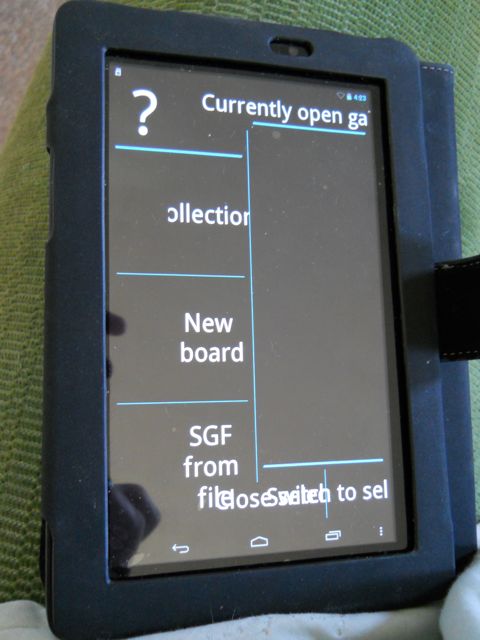
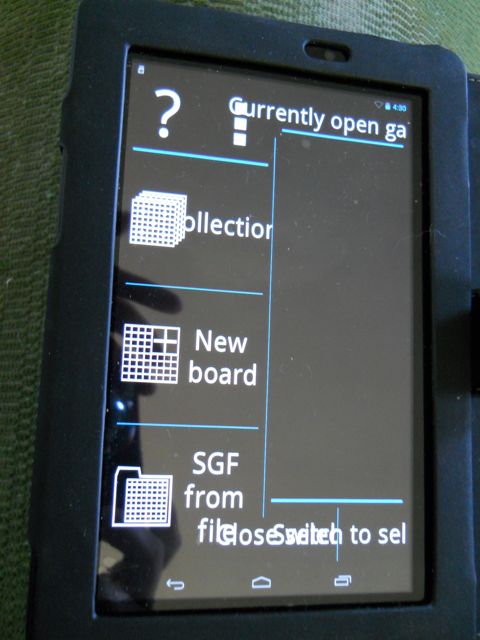
Okay, since I couldn't get a screenshot to work, here are some photos...the problem seems to be in the Tablet Mode, which was my default setting. Phone mode looks fine. In fact, when I tried to switch back to either regular or flipped tablet mode (in the debug version, didn't try it in the original) No Go crashed and exited to the desktop, like you said it might. (So I may not be able to try any experiments in tablet mode for you at the moment.)
Yes, the new debug download has the same problems, though the front page is a little different.
This is the original front page, in tablet mode--
- DSCN0571.jpg (42.48 KiB) Viewed 9646 times
This is the new debugged version--the graphics appear now.
- DSCN0573.jpg (45.19 KiB) Viewed 9646 times
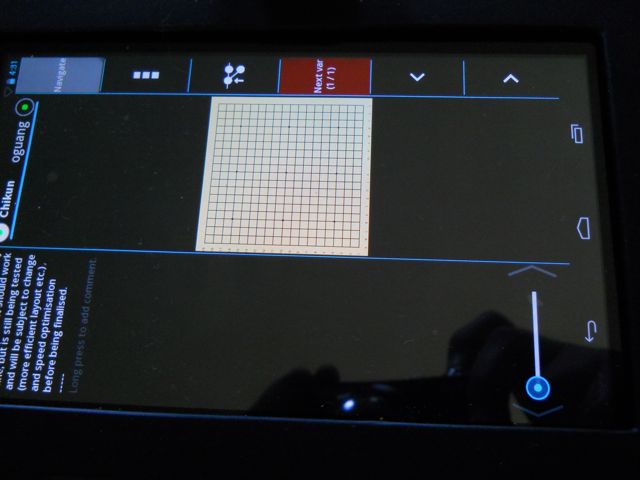
Clicking on the menu selection worked.(Though it was vertical, phone-style. Come to think of it, all of this was vertical.) But this is what the game page looked like...board just a LITTLE small.
- DSCN0574.jpg (35.85 KiB) Viewed 9646 times