Page 1 of 3
Cgoban being blocked in a future Java security update?
Posted: Wed Oct 16, 2013 5:44 am
by Exithere
Hello,
I always update Java because of security reasons, and for a time now I always got a warning about running it because of security reasons, of course I ignored it because I trust KGS, but now after a recent Java update it states that in a future Java security update that Cgoban will be blocked?
I really like KGS, so am I misunderstanding something? I added three screenshots for further information, because I think since the sound issues not everyone is updating Java anymore. Should I just avoid updating Java from now on, or will Cgoban be updated?


Re: Cgoban being blocked in a future Java security update?
Posted: Wed Oct 16, 2013 6:13 am
by leichtloeslich
Have you even tried googling this? Just the first part of the error msg together with java yielded
this, which links to
this.
So it's really just a convention thing and according to the Oracle page you could avoid it by running the cgoban jar-file directly (without webstart).
As for the KGS security model, the official website basically
recommends downgrading your java-version severely to circumvent an easy to fix sound bug, which is frankly insane.
Re: Cgoban being blocked in a future Java security update?
Posted: Thu Oct 17, 2013 6:17 am
by Exithere
Thanks for your help.
Re: Cgoban being blocked in a future Java security update?
Posted: Thu Jan 16, 2014 2:15 pm
by drgoplayer
I am only able to enter gokgs thru web browsers after another java update. I had to add these exceptions to javaws to do that:
http://files.gokgs.com
http://files.gokgs.com/javaBin/cgoban.jar
using ubuntu add the exceptions under the security tab. in linux open javaws from the terminal as root (sudo javaws)
in windows probably just use Start, Run, cmd and type javaws
Re: Cgoban being blocked in a future Java security update?
Posted: Thu Jan 16, 2014 3:54 pm
by Tommie
Dear all,
I just upgraded JAVA and now 'my security settings' in JAVA
wouldn't allow me to run cgoban.
(despite that I clicked somewhere on 'trust')
How do I get cgoban running?
Above explanations where not yet helpful, I do not get to the stage where I could assign 'exceptions'.
Who has undergone & solved the same problem?
[Windows 7, Firefox]
(I can watch 1 KGS game at a time on my mobile, but it's too cumbersome to play)
Many thanks in advance,
Tommie
Re: Cgoban being blocked in a future Java security update?
Posted: Thu Jan 16, 2014 5:03 pm
by leichtloeslich
Have you tried running the jar-file directly?
In a command line that should be
assuming "java.exe" is in your PATH and cgoban.jar is in the current directory.
Alternatively, in the java control panel under security you can change the security level. Maybe just lowering this from "Very high" to "High" might do the trick.
The java control panel should be found in your windows control panel under "java" or "java control panel".
Re: Cgoban being blocked in a future Java security update?
Posted: Thu Jan 16, 2014 6:20 pm
by badukJr
I also can no longer run cGoban3 after Java 7.51.
I guess this is the end for KGS.
Re: Cgoban being blocked in a future Java security update?
Posted: Thu Jan 16, 2014 10:50 pm
by macelee
It took me 20 minutes and several reboots to change the settings properly in order to run a Java applet (that I wrote to be used by my self only). Oracle is changing the way it presents the security warnings for every new Java updates. This is just crazy.
Re: Cgoban being blocked in a future Java security update?
Posted: Thu Jan 16, 2014 11:27 pm
by tchan001
I had that problem with the webstart version, then I downloaded the jar version and dragged the icon to the start button and pinned it there. Now it works well just from the jar version.
Re: Cgoban being blocked in a future Java security update?
Posted: Fri Jan 17, 2014 12:24 am
by RobertJasiek
You can try offline installation:
http://senseis.xmp.net/?CGoban3OfflineInstallation
Under Windows, if the JRE sandbox does not work for CGoban, you can alternatively use Integrity Levels to let it run in the LOW sandbox for all your internet applications configured that way:
http://www.lifein19x19.com/forum/viewto ... cgoban+low
http://home.snafu.de/jasiek/windows_sec ... ncept.html
Re: Cgoban being blocked in a future Java security update?
Posted: Fri Jan 17, 2014 10:58 am
by leichtloeslich
So I just got the update, and my very first suggestion (running cgoban.jar directly) worked.
A more clean solution to let you continue webstart would be in the java control panel in the security tab to add the exception sites
http://files.gokgs.com/
http://pandanet-igs.com/
The pandanet site is for gopanda (if you happen to use that). This is the solution drgoplayer posted and works just fine here.
RobertJasiek wrote:
Under Windows, if the JRE sandbox does not work for CGoban, you can alternatively use Integrity Levels to let it run in the LOW sandbox for all your internet applications configured that way:
[...]
Your windows security concepts seem rather misplaced in this thread, as they have nothing to do with the problem at hand.
Re: Cgoban being blocked in a future Java security update?
Posted: Fri Jan 17, 2014 1:07 pm
by snorri
So, from an Oracle blog, some
background. I'd like to emphasize that although user workarounds are possible, it is the application author's responsibility to address this sort of thing and ample warning was provided.
That being said, I prefer the Java Control panel workaround. That way, if WMS gets around to updating CGoban, I'll get the latest version quicker.
So first, find the Java control panel. In Windows, you can launch the control panel and search for it:
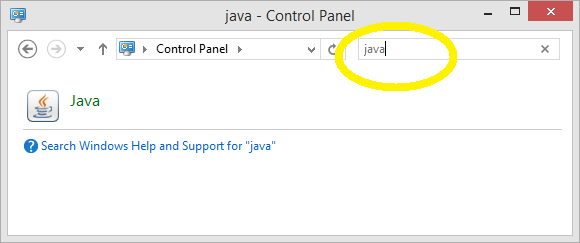
- findjavacontrol.png (10.42 KiB) Viewed 39207 times
Click that thing that looks like a coffee cup drawn by an artist on psychedelics. (Don't get me wrong, I still like Duke.)
This will bring up a dialog with a bunch of tabs. Select the security tab.
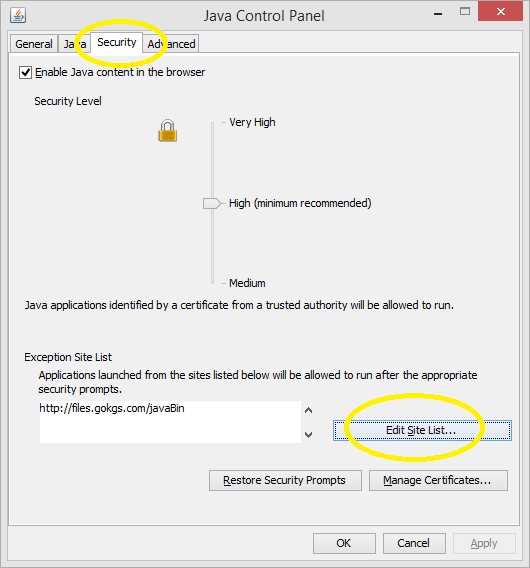
- javacontrol.png (24.07 KiB) Viewed 39207 times
Then, click the "Edit Site List" button and you should get this:
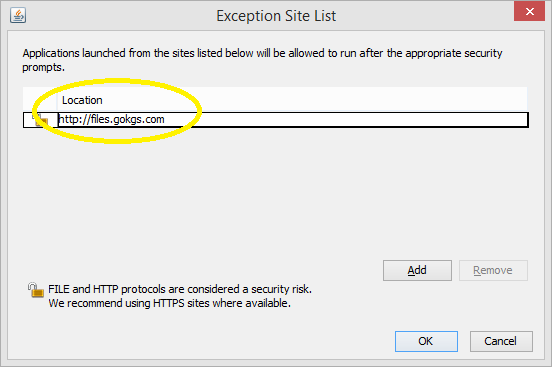
- javacontrol2.png (13.96 KiB) Viewed 39207 times
Add
http://files.gokgs.com, click Add, OK, and OK, and try again by going to
http://www.gokgs.com and following the link again to "Download Client and SGF Editor", then either "CGoban for Java Web Start" or "CGoban3 with no file association" as appropriate. (The latter is better if you already have another SGF editor installed that you prefer to use.)
If this does not help, I'd be curious to know so feel free to PM me.
Re: Cgoban being blocked in a future Java security update?
Posted: Fri Jan 17, 2014 1:32 pm
by RobertJasiek
leichtloeslich wrote:Your windows security concepts seem rather misplaced in this thread, as they have nothing to do with the problem at hand.
The OP shows a message box saying "[...] allows the application to run with unrestricted access to your personal files and other ressources on your computer [...]". Using Integrity Level LOW as described in the related section of my windows security concept page and the CGoban settings for that prohibit the application to access personal files or (quite some) other ressources on the computer. Therefore, Integrity Levels can well contribute to solving an important part of the security problem, even if java and CGoban should be buggy and malware should attack them and circumvent JRE's own sandbox. It will then be restricted by the integrity level.
Re: Cgoban being blocked in a future Java security update?
Posted: Sat Jan 18, 2014 4:08 am
by wineandgolover
This deserves a new topic. Seems urgent to me.
Great job on the windows solution, snorri. Can somebody post a similar, step-by-step guide for osX?
Sadly, not all of us are tech wizards who already know about flags, exceptions, etc., so the solution needs to be written for computer DDK.
I hope my mac doesn't auto-upgrade java, though I wouldn't feel safe supressing updates for long.
Come to the rescue, WMS!
Re: Cgoban being blocked in a future Java security update?
Posted: Sat Jan 18, 2014 12:20 pm
by drgoplayer
I have the client running in ubuntu 10.04 now. Probably will work in all debian versions or all linuxes.
From terminal
sudo javaws (opens console as root user and will require your password)
ensure that
http://files.gokgs.com
http://files.gokgs.com/javaBin/cgoban.jar
are added to the exception list under the security tab.
Now from terminal you should be able to run the client with
sudo javaws
http://files.gokgs.com/javaBin/cgoban.jnlp
It may ask for you root user password and the first time it will download the client file. It will also give the security warnings that are shown in earlier posts.
Hopefully wms will get settled into his new job and then take a look at updating the client to be compatible with future java security updates.